The Machine-Readable Zone (MRZ) is the section at the bottom of a passport with two or three lines of coded characters. It helps machines quickly read and verify your details, such as name, passport number, date of birth, and expiry date.
This makes border checks and identity verification faster and more accurate, while reducing mistakes.
If you’re curious about the Machine-Readable Zone, this blog is for you. Get ready to explore some interesting information ahead.
What Is the Machine-Readable Zone (MRZ)?
The Machine-Readable Zone (MRZ) is a special section on ID documents, usually found at the bottom of the passport’s data page. It includes the passport holder’s personal details in a coded format that machines can quickly read using Optical Character Recognition (OCR) technology.
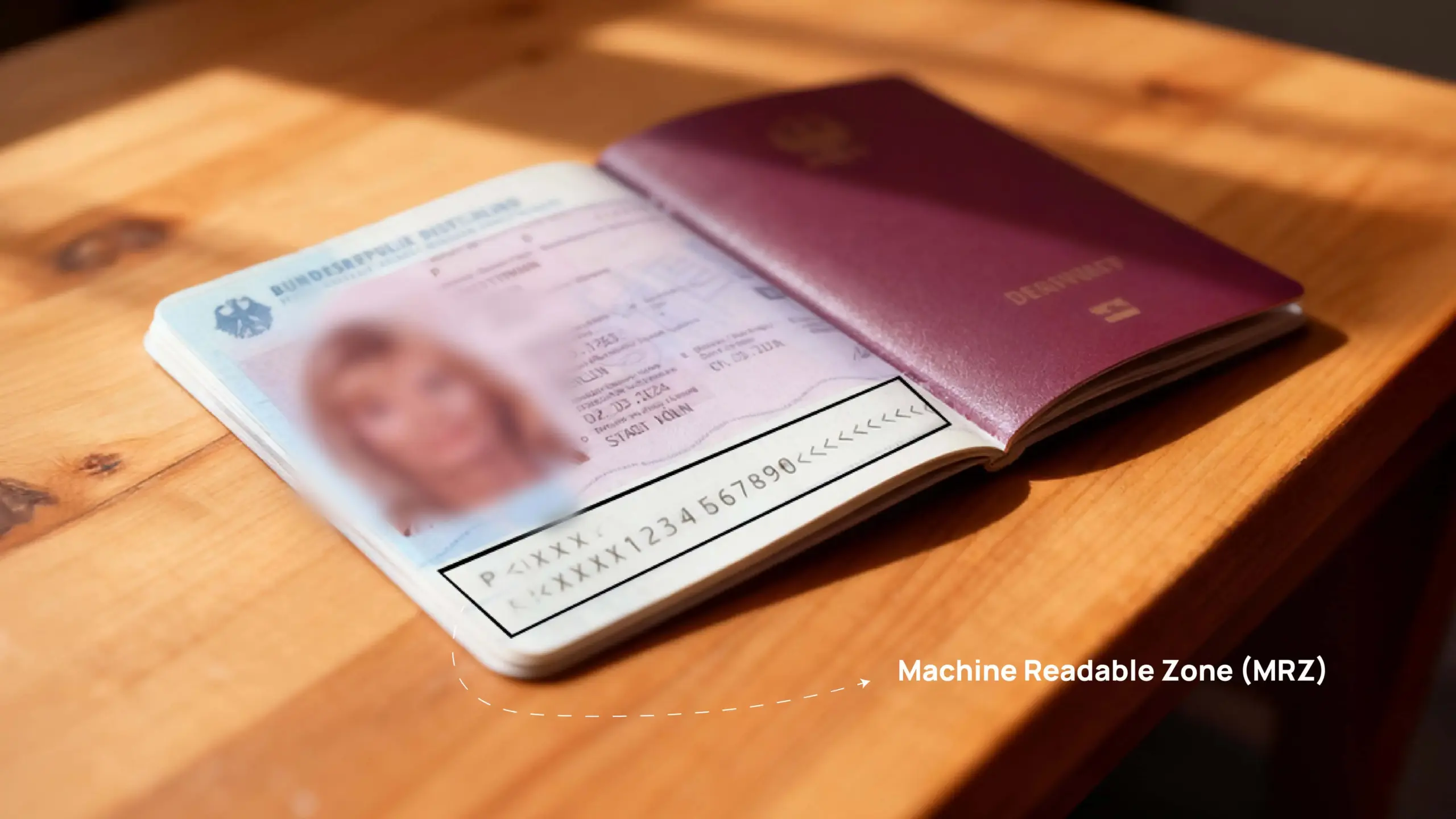
See the image below, where you can find the MRZ has two or three lines of letters, numbers, and symbols. Most passports use the Type 3 format, which has two lines with 44 characters each.
It is to speed up identity checks at airports and embassies. It removes the need for manual typing, reduces human errors, and improves both efficiency and security.
To be clear and precise, the MRZ contains important details such as:
- Document type (for example, “P” for passport)
- Issuing country code (for example, “ARE” for the UAE)
- Full name of the holder
- Passport number
- Nationality
- Date of birth
- Gender (M, F, or X)
- Passport expiry date
In the UAE, all modern passports, including those issued by the UAE, must have an MRZ as required by the International Civil Aviation Organization (ICAO). Here are the MRZ types and how they look.
| MRZ Type | Found On | Number of Lines | Example Format |
| TD3 (Most Common) | Standard passport (booklet) | 2 lines, 44 characters each | P<ARE<NAME<<FIRST<<<<<<<<<<<<<<<<<<< A1234567<ARE8501012M3001012<<<<<<<<<<<<<<06 |
| TD1 | ID cards or some travel documents | 3 lines, 30 characters each | I<ARE123456789<<<<<<<<<<<<<< 8501012M3001012ARE<<<<<<<<<< NAME<<FIRST<MIDDLE<<<<<<<< |
| TD2 | Some older or special-format passports | 2 lines, 36 characters each | P<ARE<NAME<<FIRST<MIDDLE<<<<<<<<<< A1234567<ARE8501012M3001012<<<<<<<<<<<<<<06 |
Why Is the MRZ Important for UAE Travellers?
The Machine-Readable Zone (MRZ) is very important for UAE travelers because it helps verify identity quickly, safely, and in a standardized way across international borders and digital systems. Its main purpose is to make travel and verification faster and more secure – something essential for a country with a high number of frequent travelers. Here is how MRZ helps:
- Fast Scanning at Airports:
The MRZ contains coded personal details in a special OCR (Optical Character Recognition) font. Machines at UAE airports (like Smart Gates) and border checkpoints around the world can scan this data instantly. This speeds up immigration, reduces human errors, and helps shorten waiting times. - Needed for Visa Applications:
Many visa forms, such as for Schengen, the UK, or the US (DS-160), ask for details from the MRZ. Using these details ensures accuracy and helps visa systems process applications smoothly and without delays. - Improves Security and Accuracy:
The MRZ includes check digits that confirm the data’s authenticity. These help systems detect any fake or changed documents, preventing identity fraud and making travel more secure. - Supports Digital Verification:
In modern e-passports, the MRZ acts as a key to open the encrypted information stored in the RFID chip. This allows deeper verification through biometric checks like facial recognition or fingerprints, making UAE e-gates faster and safer for travelers. - Works Worldwide:
The MRZ format follows standards set by the International Civil Aviation Organization (ICAO). This means UAE passports can be easily read and verified in any country, ensuring smooth and reliable international travel.
How to Locate and Read the MRZ on Your Passport
The Machine-Readable Zone (MRZ) is found at the bottom of your passport’s personal details page. It has two lines with 44 characters each (in standard passports) and uses only capital letters (A-Z), numbers (0-9), and the filler symbol <.
1. Location:
Open your passport to the page with your photo and personal details. You’ll see two lines of text at the bottom of this page – that’s the MRZ.
2. Appearance:
The MRZ is printed in a clear, even font called OCR-B, which is specially made for machines to read using Optical Character Recognition (OCR) technology.
The MRZ follows a specific structure. Each section represents a piece of personal information.
Line 1: Basic Details
The first line mainly shows the document type, issuing country, and your name.
| Position | Data Element | Description | Example (UAE Passport) |
| 1 | Document Type | “P” for passport | P |
| 2 | Sub-type | Usually, a filler symbol “<.” | P< |
| 3–5 | Issuing Country | Three-letter country code (e.g., ARE) | ARE |
| 6–44 | Name | Surname followed by “<<”, then given names. Spaces and hyphens are replaced by “<”. | SURNAME<<GIVEN<NAME<<<<<<<<<<<<<<<<<< |
Line 2: Personal Information
The second line contains your passport number, nationality, date of birth, gender, expiry date, and check digits.
| Position | Data Element | Description |
| 1–9 | Passport Number | Your passport’s unique number. |
| 10 | Check Digit | Used to confirm the passport number is correct. |
| 11–13 | Nationality | Three-letter country code (e.g., ARE). |
| 14–19 | Date of Birth | Written as YYMMDD (Year, Month, Day). |
| 20 | Check Digit | Confirms the date of birth is correct. |
| 21 | Gender | M (Male), F (Female), or < (Unspecified). |
| 22–27 | Expiration Date | Written as YYMMDD. |
| 28 | Check Digit | Confirms the expiry date is correct. |
| 29–43 | Personal Number | An optional field, sometimes filled with “<”. |
| 44 | Composite Check | Verifies the accuracy of the entire line. |
3. About Check Digits
Check digits are special numbers created using a specific formula based on the other digits in a field. When machines scan the passport, they recalculate these check digits to confirm the information is correct. This helps detect errors or tampering, improving both accuracy and security.
For detailed technical rules and encoding formats, you can refer to the ICAO Doc 9303 standard.
How MRZ Helps During Visa Applications
- Visa centers use MRZ to fill in your details automatically:
When you apply through centers like VFS Global, BLS, or TLS Contact in the UAE, they scan the MRZ from your passport. This allows their system to automatically fill in your personal details, saving time and reducing typing errors. - Online visa forms need MRZ information for accuracy:
Many visa portals – including Schengen, UK, US, and Canada- ask you to upload or enter details from your MRZ. This ensures your application matches your passport information exactly, which helps immigration systems verify your data quickly. - Mistakes in MRZ data can cause delays or rejection:
If the MRZ details are entered incorrectly, your application may be delayed or even rejected. This is especially common in Schengen systems that rely on exact data matching. Always double-check your MRZ details before submitting your visa form.
Common Issues with MRZ and How to Avoid Them
There’s a chance you may have issues with your MRZ. But we’ve already mentioned the solutions, so if you find any mistakes, the answer is right here.
- Unreadable MRZ
Scratches, tears, or covers make the MRZ hard for machines to read.
In order to avoid that, keep your passport clean and protected. Avoid folding or damaging the data page. - Mismatch with Manual Entry
Manually typed information doesn’t match the MRZ. So, copy all details exactly as shown in the MRZ when filling forms. - Blurry MRZ Photo
Poor lighting or unclear photos make the MRZ hard to read. Take a clear, well-lit photo. - Damaged Passport Page
Water, bending, or wear damages the MRZ lines. Protect your passport from moisture and keep it flat. Replace it if the MRZ becomes unreadable. - Incorrect MRZ Details
Printing or data entry mistakes during passport issuance. Check your MRZ after receiving your passport and report errors immediately. - Using Old Passport Details
Submitting an old MRZ for new visa or travel applications. Always use your latest passport details when applying for visas. - Scanner Errors
Machines fail to read the MRZ properly. Wipe the MRZ area to remove dust or smudges and scan again. Ask staff for manual verification if needed.
Machine-Readable vs. E-Passports: Are They the Same?
No, they’re not the same. An e-passport is an upgraded version of a regular machine-readable passport (MRP). Both can be read by machines, but the e-passport has an electronic chip that stores your personal and biometric details. This chip makes travel more secure and allows faster checks at e-gates. Regular MRPs don’t have a chip; they only use the printed information and MRZ for scanning or manual inspection.
Things to Remember for UAE Travelers Using MRZ-Based Systems
- Copy MRZ Lines Exactly When Filling Visa Forms:
Always enter the MRZ details exactly as they appear on your passport. Do not add spaces, change characters, or make manual edits. Accurate data entry ensures that visa applications process smoothly and reduces the risk of delays or rejection. - Use a Passport Scan When Possible:
Many online visa portals allow you to upload a scan or photo of your passport’s personal details page. Using this method is better than typing details manually because it eliminates errors and ensures the data matches your MRZ exactly. - Keep Your Passport Clean and Undamaged:
Protect your passport from scratches, water, and bending. A damaged MRZ may fail to scan at airports or visa centers, causing delays. Treat your passport carefully to keep the MRZ readable at all times. - Ensure Biometric Chip and MRZ Compatibility for Frequent Travelers:
If you travel often, check that your passport’s MRZ works with the embedded biometric chip. This ensures faster processing through e-gates at airports and other automated systems, making your journey smoother and more efficient.
Ready to Travel? Check Your Passport’s MRZ Before You Apply
Before you submit visa applications or travel abroad, always double-check your passport’s MRZ and its validity. If the MRZ is damaged, faded, or unclear, renew your passport to avoid problems at immigration or visa centers.
For UAE residents applying for Schengen, US, or UK visas, ensuring MRZ accuracy is especially important. Correct MRZ details help prevent delays or rejections and make your travel process smoother.
You can also check our upcoming Schengen visa guide for more tips on using MRZ information effectively.
FAQs
-
Where can I find the MRZ on my UAE passport?
At the bottom of the page, with your photo and personal details.
-
Do all UAE passports have MRZ?
Yes, all UAE passports issued after 2017 have an MRZ.
-
Is the MRZ different for each country’s passport?
Yes, each country uses its own issuing code and format within the standard MRZ rules.
-
What does “P<ARE” mean in MRZ?
“P” stands for passport, and “ARE” is the UAE country code.
-
Is MRZ the same as the chip in my e-passport?
No, the MRZ is printed for machine reading, while the chip stores biometric data.
-
Can I have MRZ errors corrected manually?
No, you must contact the passport-issuing authority to correct MRZ errors.
-
How do I know if my MRZ is working correctly?
Check that it is clear, undamaged, and scannable; immigration or visa centers can confirm this.